Tuesday, August 7, 2012

Topspin 2.1 Acquisition install and RHEL 6.3

Our previous topics on Topspin 2.1 install issues on a 64 bit system pretty much pertained to a data processing workstation.   When you include the full acquisition suite, which pretty much means the diskless client, you will face few more obstacles before you are done.  This is more to do with the modern EL6.3 version rather than the fact that the system is a 64 bit one.

We will mention a few, hopefully, helpful pointers through this post on those.

 bootparamd:   As of Topspin 2.1,  diskless still relies on bootparamd daemon for uploading to the spect client from the ASP_ST2 server.  With Enterprise Linux 6.3, bootparamd is no longer available as a rpm.  We have to either copy it from the TS2.1 install dvd and install it or pull a hopefully fresher version from the web.  I normally look in  www.rpmfind.net. 

  • The install program gives this message box : 

You can in principle install the version from TS2.1 disk. But it is of the RHEL4 flavour,  I looked in rpmfind.net and found a version that is built for CentOS 5.8, which is close enough.  The version I pulled as of this writing :   0.17-26.el5_7.1.x86_64.   Please remember that the daemon I am running is on the 64 bit host and that is why I installed the x86_64 version.

portmap  :You will see an error message about the missing rpm for portmap.  Here is the message box :
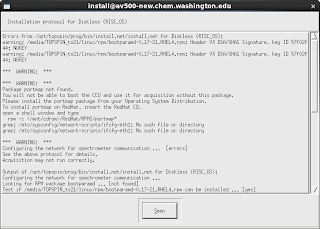

  •  Once again I pulled the 64 bit Centos 5.8 version for this rpm and installed it.  By the way, when you try installing this via the gui and get an error message, simply copy the /tmp/portmap.rpm to some other location and use rpm -ivh portmap_xxx.rpm   to complete the install.
tftp : Unless you installed it specifically,  you will get a message about missing tftp (trivial file transfer protocol). This should be available in the standard RHEL 6.3 repo and you can install it readily.

dhcp : Since the spectrometer host is also the ASP_ST2 server, it needs to run a dhcpd server to provide the static IP to spect  in the 149.236.99.0 subnet.  If you have not done so, you can install dhcp package from the standard repo.
To check if the above steps worked for you,  start the Topspin install program again and this time, only install diskless  from the list of available modules. If it goes without any errors then you are ok.

eth1 : Like me, if you are building a new system to replace an existing spectrometer host, make sure that you have a second ethernet NIC in the system. If not, the TS install program will complain about not being able to start the eth1 network card.  This is ok, as long as you remember to put that second ethernet card in the system and configure it to be eth1, either by hand or by using the NetworkManager.

If eth1 is not already configured at the time of TS2.1 install, your diskless install will complain that the dhcpd daemon cannot start. This is because the /etc/dhcpd.conf file is configured to listen to client traffic packets on the interface eth1, which is not up and running.  You can consult /var/log/messages to see these error messages, by simply grep-ing for dhcpd.


Tuesday, July 31, 2012

Topspin and 32 bit libraries in a 64 bit system

On and off we have touched upon this topic, either in the context of making Topspin play well with Fedora or RHEL5. In particular, this problem is related to the inability of Topspin not able to source the 64 bit libraries.   This is a small snippet in that list. Hopefully, I will summarize the required libraries and rpm-s in a comprehensive post later.

System :  RHEL 6.3 on a Intel 64 bit machine (Dell Optiplex 390)

After the install, I needed to install the following 32 bit rpm-s that essentially provide X11 related shared object libraries.  Please remember that, in a 64 bit system like the above, the 64 bit versions of these shared libraries are already installed.  Since Topspin takes a minimalist approach, it only looks for files under /usr/lib instead of /usr/lib64, to give an example.

The following 32 bit rpm-s are needed even for TS install to work properly, via the graphical interface. 

glibc.i686             : 
glibc-devel.i686    : 
libX11.i686 (this gets pulled in as a dependency if you install libX11-devel)
libX11-devel.i686  : 

After install, once your flexlm license manager is started
correctly, the TS startup halts at the point where the
welcome screen is supposed to come up.
One or more of the shared library files will be reported
to be missing in the console window, at this stage. The rpm-s shown above are the ones that provide those missing shared object libraries.
The following are needed for the TS gui to start correctly.


libXext-devel.i686 
libXtst.i686


 After the above rpm-s are installed,  the GUI comes up without any issues.

Thursday, July 26, 2012

High T served..

How high can I go with my VT setup ?  This is a nagging but relevant question that needs a definitive answer for many users.  I ran  the following test to figure this out.

Here is some useful info first, as to what we already know.

  • The recommended temperature extremes that the room temperature bore can tolerate is between 0 C to 50 C.
  • The shim stack itself can apparently handle +80C (this needs clear confirmation from Bruker and I am working on it).
  • There is no active thermal shielding setup between the probe head sample space and what surrounds it.  In non-gradient model probes, there used to be a vacuum dewar that provided effective insulation. 
  • The gradient coil takes up the space occupied by the vacuum jacket and this means that the heat will transfer from the coil space to the probe sleeve and then onto the RT shim stack and eventually to the RT bore itself (heat will flow in the opposite direction for low VT experiments)
  • Bruker provides an active cooling mechanism by providing either a barbed connector or a compression coupling at the top of the BST (Bruker Sample Transport) assembly.  We are asked to provide an air flow of 200 to 300 L/hr through this to cool the shim stack. We don't need much pressure since this is supposed to be a free flow, where the cooling air exits out of the bottom of the shim stack.
  • When we jacked up the flow beyond 600 L/hr., the sample is getting lifted from its seated position and so that should give us an upper cutoff.
We employed the temperature and humidity logger from a company called 'Onset'.  They have a windows based $$ware called HOBOware that controls the logger, transfers data to the PC and plots it. 

Tuesday, June 12, 2012

Topspin 1.3 Compilation Issues - III

I think this problem has been on and off lurking with only the TS 1.3 systems.  The summary  relevant to the topic is that, Bruker has released a 'revamped' makeau script and has rewritten several of the commonly employed au scripts such as :  multizg, multicmd, multi_zgvd, multi_zgvt, simplex, to name a few.

The new 'makeau' should be in the following directory :

$XWINNMRHOME/exp/stan/nmr/au/

The new au scripts themselves should be here :

$XWINNMRHOME/exp/stan/nmr/au/src

In my peculiar case, I had an additional problem that has crept up  for an inexplicable reason.  This is that, the important include file called exptUtil has been copied over from a Topspin 3.0 distribution, onto the DRX499 system which runs the TOPSPIN 1.3. The two versions are different from each other. 

exptUtil lives in the following location :

$XWINNMRHOME/prog/include/inc

In conclusion, with the correct exptUtil, makeau compilation script and the new au source files,  compilation seems to run smoothly.  I did a recompilation of all 'au' programs via 'expinstall' in DRX499 and that proceeded without a hitch.  The same on DPX200 was mostly successful i.e. some scripts did produce an error, which I suspect are some of the user made 'au' scripts.

We will expand on those later, if it becomes important to investigate. 


Thursday, April 19, 2012

TOPSPIN 3.0 AND SHARED LIBRARIES...

It will be useful to keep the following post open in another window, as I discuss this : TUESDAY, APRIL 20, 2010 Topspin Display issues and Fedora - in General. More important is the comment I added to this post.

After my recent upgrade to FC16, I could not do 'ased'  or display my pulse program. Similar to my comment to the post quoted above, I got a cryptic killed process error message rather than a complaint about the missing libraries.  Nevertheless,  indeed the problem was with the missing shared libraries.

I used the following BASH script to smoke out all the modules that might be suffering from whatever deficiency there is vis-a-vis unavailable shared libraries.

#!/bin/bash
for i in `ls -1 /opt/topspin3/prog/mod`
 do 
     if [[ `/opt/topspin3/topspin -e ldd /opt/topspin3/prog/mod/$i` == *not* ]]; then 
echo $i;
     fi
done


This lists out all the modules that are lacking the needed libraries.   
I then ran the ldd by hand on those modules to find out the names of needed libraries.  A followup with a 'yum search --> yum install'  completed the process.  In all the cases I looked for the i686 version since  even with Topspin3.0, it looks for the shared libraries in /usr/lib and not in /usr/lib64. 

As you could see, some of the lacking libraries are already installed as the 64 bit version in /usr/lib64, but this doesn't help the casue of TS3.

Monday, February 13, 2012

TOPSPIN 1.3PL10 ICON-NMR hiccup

When we start ICONNMR, from within Topspin, the interface comes up but when we attempt to start an automation run, it gives an error that says, in a nutshell, that the common library file :  libssl.so.2 is not accessible.    We have encountered similar 'share library deficiency' problem in the past, in the context of making TS2.1 run on a Fedora platform.

The shared library in question is evidently related to TLS/SSL, since this error message is triggered in the first place, by trying to access /opt/topspin/prog/tcl/libtix/tls1.5/libtls.so.    From my understanding thus far, the TLS/SSL will play a role most probably when serving the Icon information via the in-built web server, where there is an option to turn on 'https' access to the same instead of 'http'. This is important from the security viewpoint since, in principle we can filter the access to this Icon web interface based on password authentication and this will be the PAM recognizable password, indeed.  Even if the content is not so serious to be protected against,  the password supply in the authentication step poses a big security hole as the former typically gets transmitted as plain text.   It is imperative that you turn on the 'https' mode or simply allow read-only access to the content without asking for any password transmission.

Coming back to the shared library, I solved the problem as below. This is where the older hard disk with its contents in tact came in very handy.   I now created a link such as :  ln -sf /lib/libssl..so /lib/libssl.so.2

When we restart ICON now, the above error message goes away but it still complains about another file in the same location as before : libcrypto.so.2.

The remedy turned out to be a step very similar to what we did above for the libssl.so.2 case.   Do a : ln -s /lib/libcrypto..so libcrypto.so.2

With these two done, ICON launches and functions without errors.  As a history, this problem of libssl being not there, is possibly linked to the ssl library update that Richard did when he reinstalled the distro. after a disk crash, though I am not totally sure about it.


Friday, October 21, 2011

Topspin and Iconnmr

From the viewpoint of safely providing a walk-on environment, IconNMR is quite handy.  Here is a simple format of how we can implement this. The immediate platform that can benefit from this is the new 800 MHz spectrometer.  

Before we proceed, keeping the target users in mind i.e. UWNetid users, we should first replicate our Krb5/LDAP auth/auth system in the 800 MHz system's host.

  • We can implement the same icewm window manager with the usual startup script. 
  • From the autostart.prop file, we can start iconnmr. 
  • IconNMR can be configured so that the user is locked out of changing any parameters.  This locks up the Topspin gui automatically so that TS is used only to display the progress of data being collected and the spectrum that gets generated. 
  • We still need to make sure that the user cannot access autostart.prop and remove the icon startup command. Such a possibility will give them a potential to access the regular TS interface freely with all its functionalities. 
  •  
With further consultation from Bruker,  it looks like this is the simplest way to implement this scheme as of now.


continued 10.24.2011

There are a few points worth recording after further investigation here.

  • When the user is logged into ICONNMR interface, based on the configuration, indeed the user cannot access the autostart.prop from the Topspin main window. In fact, most of the pull down menu items on the top are disabled automatically.
  • One caveat that needs to be mentioned is this. It takes a few seconds for the autostart.prop to kick in so that IconNMR starts up in earnest. During this period, the topspin window is like a normal window. Nevertheless one cannot prevent IconNMR from starting eventually.  
  • A more serious issue is the following : Until a dataset is open from within ICONNMR, the gui lockdown does not commence.
  • The TOPSPIN gui lock down includes the inability for a user to close the TS window by brute force i.e. by using the 'X' widget on the top right corner of the window.